Developer Guide
- Acknowledgements
- Setting up, getting started
- Design
- Implementation
- Documentation, logging, testing, configuration, dev-ops
- Appendix: Requirements
- Appendix: Instructions for manual testing
Acknowledgements
-
This project is based on the original AddressBook Level 3 (AB3) project by the SE-EDU initiative.
- The project uses the following third-party libraries:
- JavaFX – for building the graphical user interface
- Jackson – for JSON data storage and parsing
- JUnit 5 – for testing
- We also referred to the SE-EDU documentation and guides:
- https://se-education.org/guides/
Setting up, getting started
Refer to the guide Setting up and getting started.
Design
 Tip: The
 .puml files used to create diagrams are in this document docs/diagrams folder. Refer to the PlantUML Tutorial at se-edu/guides to learn how to create and edit diagrams.
 Note on Naming Convention: “Person” vs “Customer”. Throughout this guide and the codebase, the term
 Person is used at the code level (e.g., Person, UniquePersonList, PersonListPanel, PersonCard). This is inherited from the original AddressBook Level 3 (AB3) project that ClientEase is based on. At the application and documentation level, however, Person and “customer” refer to the same entity — an individual whose contact and order details are stored in ClientEase. The term “customer” is preferred in user-facing contexts and prose descriptions to better reflect the target use case of the application. Developers should be aware of this distinction when navigating between the codebase and this guide.
Architecture
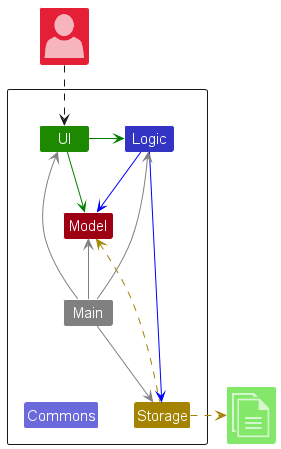
The Architecture Diagram given above explains the high-level design of the App.
Given below is a quick overview of main components and how they interact with each other.
Main components of the architecture
Main (consisting of classes Main and MainApp) is in charge of the app launch and shut down.
- At app launch, it initializes the other components in the correct sequence, and connects them up with each other.
- At shut down, it shuts down the other components and invokes cleanup methods where necessary.
The bulk of the app’s work is done by the following four components:
-
UI: The UI of the App. -
Logic: The command executor. -
Model: Holds the data of the App in memory. -
Storage: Reads data from, and writes data to, the hard disk.
Commons represents a collection of classes used by multiple other components.
How the architecture components interact with each other
The Sequence Diagram below shows how the components interact with each other for the scenario where the user issues the command delete 1.
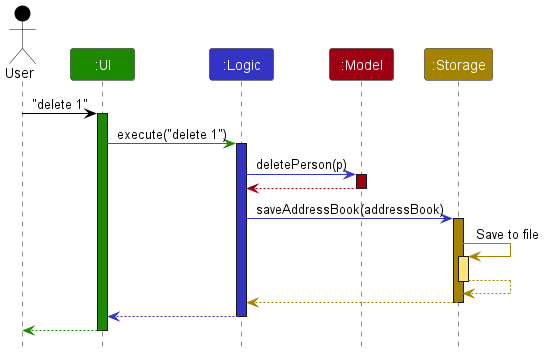
Each of the four main components (also shown in the diagram above),
- defines its API in an
interfacewith the same name as the Component. - implements its functionality using a concrete
{Component Name}Managerclass (which follows the corresponding APIinterfacementioned in the previous point.
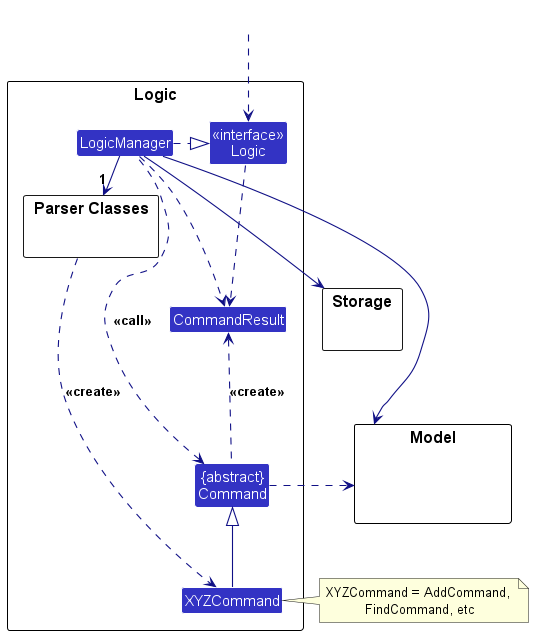
For example, the Logic component defines its API in the Logic.java interface and implements its functionality using the LogicManager.java class which follows the Logic interface. Other components interact with a given component through its interface rather than the concrete class (reason: to prevent outside component’s being coupled to the implementation of a component), as illustrated in the (partial) class diagram below.
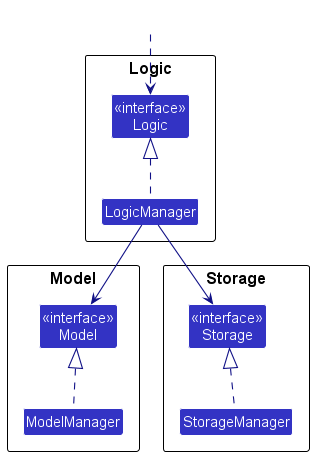
The sections below give more details of each component.
UI component
The API of this component is specified in Ui.java
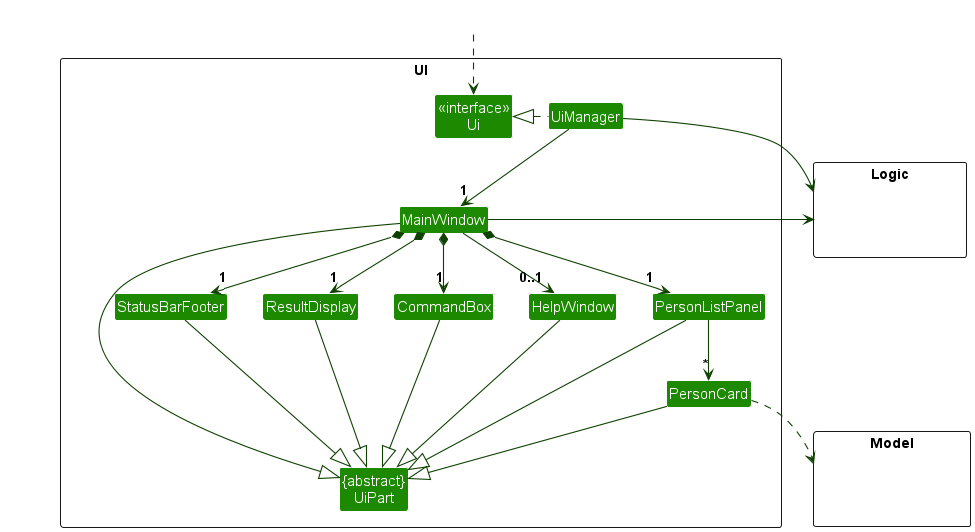
The UI consists of a MainWindow that is made up of parts e.g. CommandBox, ResultDisplay, PersonListPanel, StatusBarFooter, HelpWindow and PersonCard. All these, including the MainWindow, inherit from the abstract UiPart class which captures the commonalities between classes that represent parts of the visible GUI.
The UI component uses the JavaFx UI framework. The layout of these UI parts are defined in matching .fxml files that are in the src/main/resources/view folder. For example, the layout of the MainWindow is specified in MainWindow.fxml
The UI component,
- executes user commands using the
Logiccomponent. - listens for changes to
Modeldata so that the UI can be updated with the modified data. - keeps a reference to the
Logiccomponent, because theUIrelies on theLogicto execute commands. - depends on some classes in the
Modelcomponent, as it displaysPersonobjects residing in theModel.PersonCarddisplays products, location, deadline, and contact information, and applies priority styling based on the total product quantity.HelpWindowalso shows the command summary and the user guide link.
Logic component
API : Logic.java
Here’s a (partial) class diagram of the Logic component:
The sequence diagram below illustrates the interactions within the Logic component, taking execute("delete 1") API call as an example.
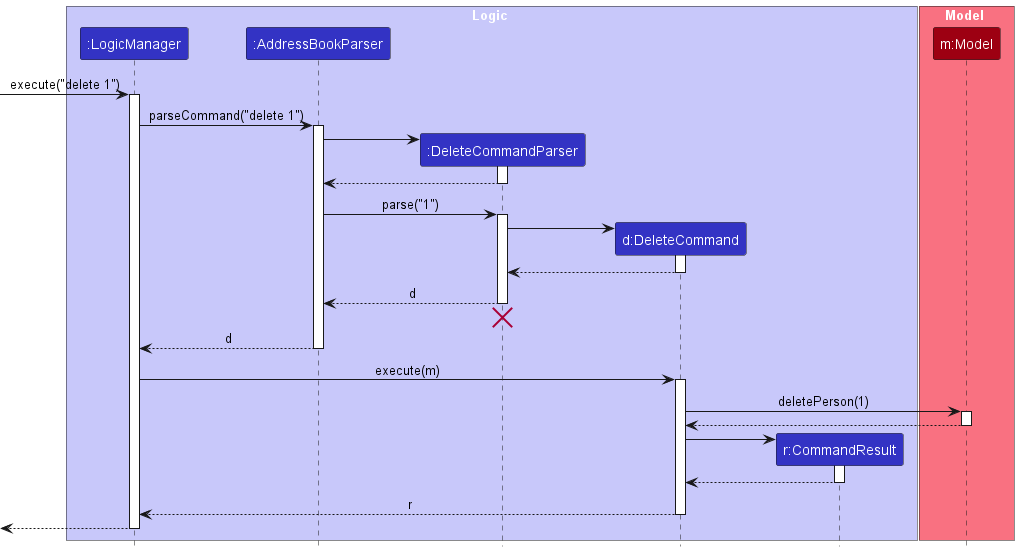
Note: The lifeline for DeleteCommandParser should end at the destroy marker (X) but due to a limitation of PlantUML, the lifeline continues till the end of diagram.
How the Logic component works:
- When
Logicis called upon to execute a command, it is passed to anAddressBookParserobject which in turn creates a parser that matches the command (e.g.,DeleteCommandParser) and uses it to parse the command. - This results in a
Commandobject (more precisely, an object of one of its subclasses e.g.,DeleteCommand) which is executed by theLogicManager. - The command can communicate with the
Modelwhen it is executed (e.g. to delete a person).
Note that although this is shown as a single step in the diagram above (for simplicity), in the code it can take several interactions (between the command object and theModel) to achieve. - The result of the command execution is encapsulated as a
CommandResultobject which is returned back fromLogic.
Here are the other classes in Logic (omitted from the class diagram above) that are used for parsing a user command:
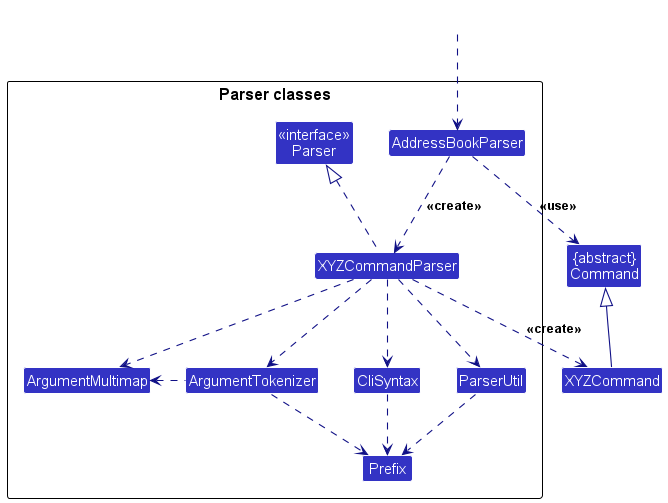
How the parsing works:
- When called upon to parse a user command, the
AddressBookParserclass creates anXYZCommandParser(XYZis a placeholder for the specific command name e.g.,AddCommandParser) which uses the other classes shown above to parse the user command and create aXYZCommandobject (e.g.,AddCommand) which theAddressBookParserreturns back as aCommandobject. - All
XYZCommandParserclasses (e.g.,AddCommandParser,DeleteCommandParser, …) inherit from theParserinterface so that they can be treated similarly where possible e.g, during testing.
Model component
API : Model.java
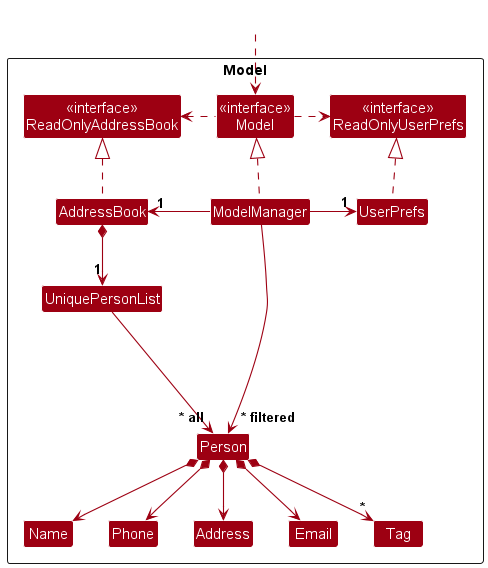
The Model component,
- stores the application data, including all
Person(customer) objects and product data contained within theAddressBook. - maintains a
Product Catalogue, which stores all available products that can be associated with customers. - exposes a filtered list of customers (
ObservableList<Person>) that represents the currently displayed list in the UI. - allows filtering of customers based on user commands such as
find. - provides methods to modify data, such as adding, deleting, and editing customers and products.
- ensures data consistency by preventing invalid operations (e.g. deleting a non-existent customer).
- stores a
UserPrefsobject that represents user preferences, exposed as aReadOnlyUserPrefs. - does not depend on the
UI,Logic, orStoragecomponents, as it represents the core data and domain logic of the application.
Storage component
API : Storage.java
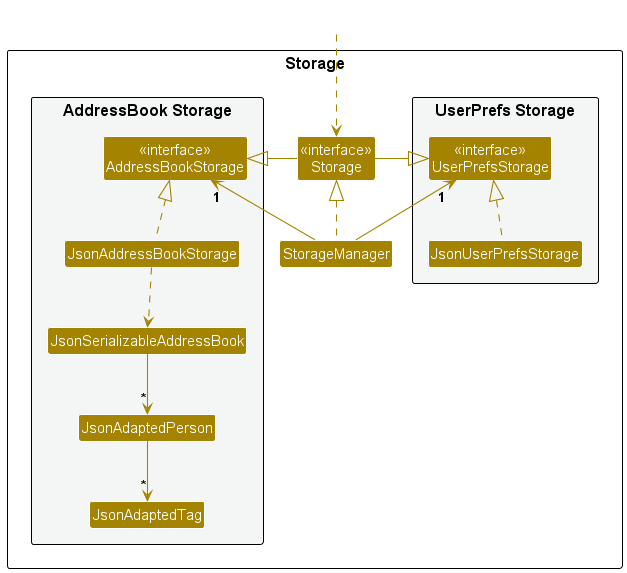
The Storage component,
- can save both address book data and user preference data in JSON format, and read them back into corresponding objects.
- inherits from both
AddressBookStorageandUserPrefStorage, which means it can be treated as either one (if only the functionality of only one is needed). - depends on some classes in the
Modelcomponent (because theStoragecomponent’s job is to save/retrieve objects that belong to theModel)
Common classes
Classes used by multiple components are in the seedu.address.commons package.
Implementation
This section describes some noteworthy details on how certain features are implemented.
Product catalogue management
ClientEase manages products through the top-level product command, which is split into three subcommands: add, delete, and list.
Overall command flow
When the user enters a command such as product add p/Muffin:
-
AddressBookParserrecognisesproductas the command word. - The remaining input is passed to
ProductCommandParser. - The parser extracts the subcommand (
add,delete, orlist). - The corresponding command object is created and executed.
The following sequence diagram illustrates how a product add command is processed:
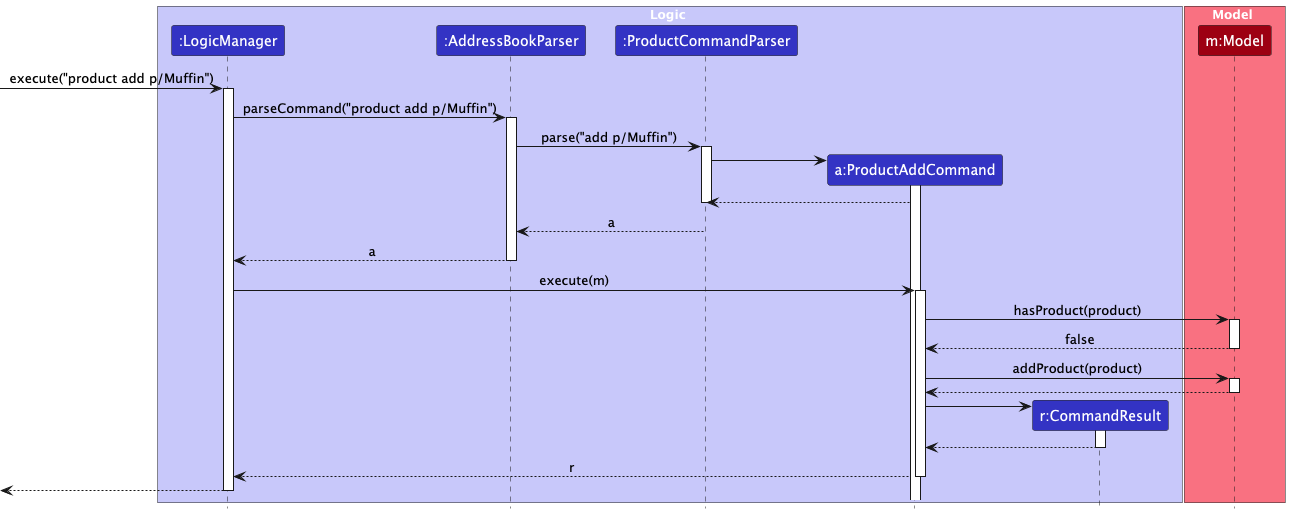
Parsing behaviour
ProductCommandParser supports both product/NAME and p/NAME prefixes.
- All prefixes are normalized internally to ensure consistency.
- Invalid inputs are rejected if they contain:
- Missing product names
- Duplicate prefixes
- Unexpected preamble text
If parsing fails, a ParseException is thrown with the appropriate usage message.
Adding a product (product add)
Handled by ProductAddCommand:
- Checks if the product already exists using
model.hasProduct(...). - If it exists → throws a duplicate-product error.
- Otherwise → adds the product using
model.addProduct(...). - Returns a success message.
This ensures that the product catalogue contains no duplicate entries.
Deleting a product (product delete)
Handled by ProductDeleteCommand:
- Checks if the product exists in the catalogue.
- If not → throws a “product not found” error.
- Checks if the product is currently used by any customer:
- Iterates through all customers in the model
- Compares against each customer’s product list
- If the product is in use → throws an error and prevents deletion.
- Otherwise → deletes the product using
model.deleteProduct(...).
This additional validation ensures that products cannot be removed while still referenced by customers.
Listing products (product list)
Handled by ProductListCommand:
- Retrieves all products using
model.getProductList(). - Sorts them case-insensitively.
- Formats them into a readable line-by-line list.
If no products exist, a dedicated empty-state message is shown.
Design considerations
- The product feature follows the existing command pattern used in ClientEase:
- Parsing → Command creation → Model update → UI feedback
- The product-in-use check in
product deleteis a key safeguard that maintains consistency between the product catalogue and customer data.
[Proposed] Undo/redo feature
Proposed Implementation
The proposed undo/redo mechanism is facilitated by VersionedAddressBook. It extends AddressBook with an undo/redo history, stored internally as an addressBookStateList and currentStatePointer. Additionally, it implements the following operations:
-
VersionedAddressBook#commit()— Saves the current application state in its history. -
VersionedAddressBook#undo()— Restores the previous application state from its history. -
VersionedAddressBook#redo()— Restores a previously undone application state from its history.
These operations are exposed in the Model interface as Model#commitAddressBook(), Model#undoAddressBook() and Model#redoAddressBook() respectively.
Given below is an example usage scenario and how the undo/redo mechanism behaves at each step.
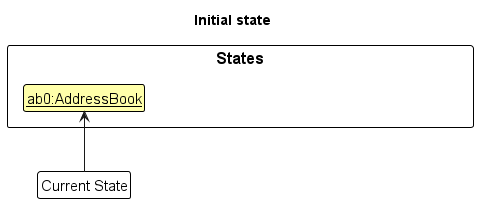
Step 1. The user launches the application for the first time. The VersionedAddressBook will be initialized with the initial address book state, and the currentStatePointer pointing to that single address book state.
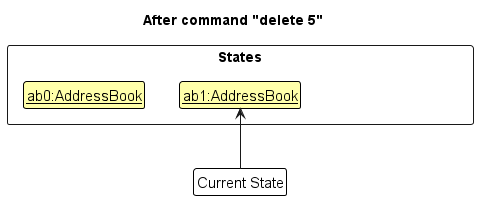
Step 2. The user executes delete 5 command to delete the 5th person in the address book. The delete command calls Model#commitAddressBook(), causing the modified state of the application after the command executes to be saved in the addressBookStateList, and the currentStatePointer is shifted to the newly inserted state.
Step 3. The user executes add n/David … to add a new person. The add command also calls Model#commitAddressBook(), causing another modified application state to be saved into the addressBookStateList.
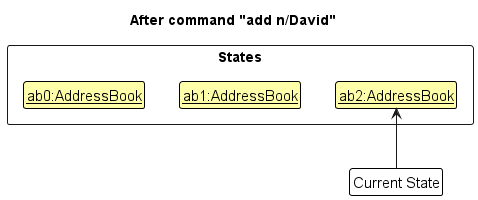
Note: If a command fails its execution, it will not call Model#commitAddressBook(), so the application state will not be saved into the addressBookStateList.
Step 4. The user executes the undo command. The undo command will call Model#undoAddressBook(), which shifts the currentStatePointer once to the left, pointing it to the previous state, and restores the application data to that state.
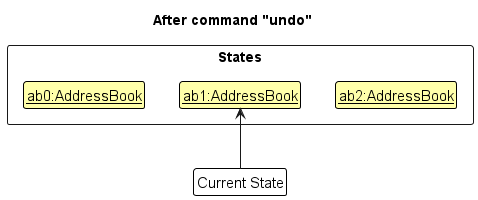
Note: If the currentStatePointer is at index 0, pointing to the initial AddressBook state, then there are no previous AddressBook states to restore. The undo command uses Model#canUndoAddressBook() to check if this is the case. If so, it will return an error to the user rather
than attempting to perform the undo.
The following sequence diagram shows how an undo operation goes through the Logic component:
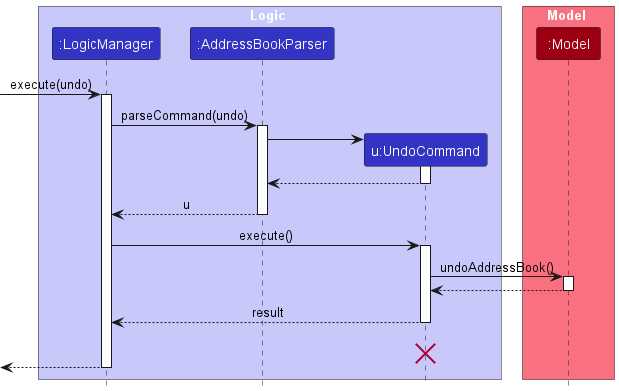
Note: The lifeline for UndoCommand should end at the destroy marker (X) but due to a limitation of PlantUML, the lifeline reaches the end of diagram.
Similarly, how an undo operation goes through the Model component is shown below:
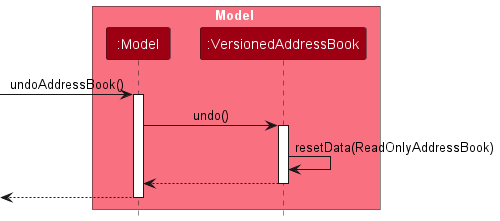
The Model delegates the undo operation to VersionedAddressBook, which restores a previous state of the entire data.
Note that the AddressBook stores both customers and the product catalogue. Therefore, undoing an operation restores all data (including customers and products) to a previous state.
The redo command does the opposite — it calls Model#redoAddressBook(), which shifts the currentStatePointer once to the right, pointing to the previously undone state, and restores the application data to that state.
Note: If the currentStatePointer is at index addressBookStateList.size() - 1, pointing to the latest address book state, then there are no undone AddressBook states to restore. The redo command uses Model#canRedoAddressBook() to check if this is the case. If so, it will return an error to the user rather than attempting to perform the redo.
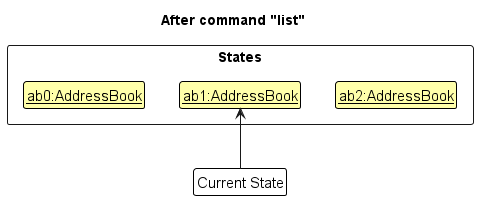
Step 5. The user executes the command list. Commands that do not modify the application data will not call commit/undo/redo methods. Thus, the addressBookStateList remains unchanged.
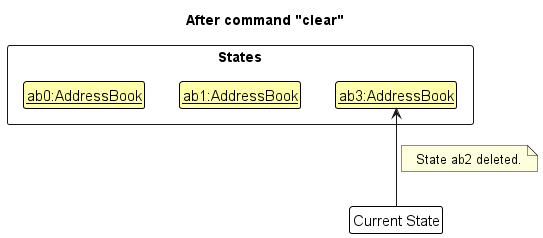
Step 6. The user executes clear, which calls Model#commitAddressBook(). Since the currentStatePointer is not pointing at the end of the addressBookStateList, all address book states after the currentStatePointer will be purged.
The clear command resets the entire AddressBook, removing all customers and products. Therefore, undoing a clear operation restores both customers and the product catalogue to their previous state.
Reason: It no longer makes sense to redo commands that modify outdated states. This is the behaviour that most modern desktop applications follow.
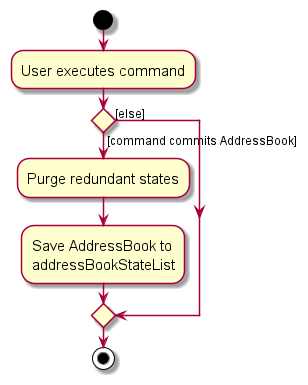
The following activity diagram summarizes what happens when a user executes a new command:
Design considerations:
Aspect: How undo & redo executes:
-
Alternative 1 (current choice): Saves the entire address book.
- Pros: Easy to implement.
- Cons: May have performance issues in terms of memory usage.
-
Alternative 2: Individual command knows how to undo/redo by
itself.
- Pros: Will use less memory (e.g. for
delete, just save the person being deleted). - Cons: We must ensure that the implementation of each individual command are correct.
- Pros: Will use less memory (e.g. for
Documentation, logging, testing, configuration, dev-ops
Appendix: Requirements
Product scope
Target user profile:
- tech-savvy home-based online business owners
- manages a small to medium customer base
- performs frequent daily updates to customer contact information
- has a need to manage a significant number of contacts
- prefer fast, command-line–style text input over GUI-driven interactions for efficiency
- can type fast
- prefer desktop apps over other types
- prefers typing to mouse interactions
- is reasonably comfortable using CLI apps
Value proposition: Enables home-based business owners to efficiently manage repeat customer contact information through fast, keyboard-driven commands, minimizing administrative overhead and keeping customer records organized and up to date without the complexity or overhead of full-scale business management systems.
User stories
Priorities: High (must have) - * * *, Medium (nice to have) - * *, Low (unlikely to have) - *
| Priority | As a … | I want to … | So that I can… |
|---|---|---|---|
* * |
first-time user | look at sample customer data when I open the app | quickly understand how customer information is structured |
* * |
first-time user | look through sample customer profiles | see what kinds of details I am able to store |
* * * |
first-time user | easily identify the main actions (add, edit, delete) | not feel overwhelmed when first using the app |
* * * |
first-time user | edit an existing customer entry | understand how updates to customer information work |
* * * |
first-time user | add a new customer using test data | try out the app without fear of making mistakes |
* * |
beginner user | set a due date for an order | manage upcoming deadlines |
* * |
beginner user | review a customer’s order history | confirm their previous preferences |
* |
user more familiar with the app | try to get familiar with the CLI | start to use the app more efficiently |
* * * |
user more familiar with the app | make simple search queries | find customers more quickly |
* * |
frequent user | set the app to open at startup | start working inside the app immediately |
* |
tech-savvy user | use the CLI to input commands | perform the tasks faster than on a graphical interface |
* |
expert user | create complex searching queries | find customers that match specific sets of criterias |
* |
long-time user | create shortcuts and aliases for frequent tasks | minimize repetition and speed up my workflow |
* * |
expert user | hide unused data | not be distracted by irrelevant information |
* * |
business owner identifying loyal customers | filter customer lists by number of purchases | quickly find repeat buyers to send thank you messages |
Use cases
(For all use cases below, the System is the ClientEase and the Actor is the user, unless specified otherwise)
Use case: Add a customer
MSS
- User enters a command to add a new customer with the required details.
- ClientEase validates the provided information.
- ClientEase adds the customer to the customer list.
-
ClientEase displays a confirmation message showing the added customer.
Use case ends.
Extensions
-
1a. The user provides invalid input format.
-
1a1. ClientEase shows an error message indicating the invalid field.
Use case resumes at step 1.
-
-
2a. A customer with the same name already exists.
-
2a1. ClientEase warns the user about the duplicate customer.
Use case ends.
-
Use case: Find a customer
MSS
- User enters a command to search for a customer using name or other keywords.
- ClientEase filters the customer list to those matching the search criteria.
-
ClientEase displays the matching customer profiles.
Use case ends.
Extensions
-
1a. The user provides invalid search format.
-
1a1. ClientEase shows an error message indicating the invalid search query.
Use case resumes at step 1.
-
-
2a. No customers match the search criteria.
-
2a1. ClientEase shows an empty list and a message indicating no matches were found.
Use case ends.
-
Use case: Delete a customer
MSS
- User requests to list customers
- ClientEase shows a list of customers
- User requests to delete a specific customer in the list by index or name
-
ClientEase deletes the customer
Use case ends.
Extensions
- 2a. The list is empty.
-
2a1. ClientEase shows an error message
Use case ends.
-
-
3a. The given index is invalid.
-
3a1. ClientEase shows an error message.
Use case resumes at step 2.
-
-
3b. No customer with the given name is found
-
3a1. ClientEase shows an error message.
Use case resumes at step 2.
-
Use case: Edit a customer’s details
Preconditions: ClientEase has at least one customer record.
MSS
- User requests to find a customer using a keyword.
- ClientEase displays a list of matching customers.
- User selects a customer from the list.
- User requests to edit the selected customer’s details by providing the new details.
- ClientEase validates the new details.
-
ClientEase updates the customer record and displays the updated customer profile.
Use case ends.
Extensions
-
1a. No customers match the search keyword.
-
1a1. ClientEase displays a message indicating that no customers were found.
Use case ends.
-
-
5a. The new details provided are invalid.
-
5a1. ClientEase displays an error message indicating the invalid field.
Use case resumes at step 4.
-
Non-Functional Requirements
- Should work on any mainstream OS as long as it has Java
17or above installed. - Should be able to hold up to 1000 customers without a noticeable sluggishness in performance for typical usage.
- A user with above average typing speed for regular English text (i.e. not code, not system admin commands) should be able to accomplish most of the tasks faster using commands than using the mouse.
- The system should respond to user commands within 2 seconds under normal usage conditions.
- The application should store customer data locally in a file so that the user can retain their data between application sessions.
- The user interface should remain usable on screens with a resolution of at least 1280×720.
- The system should not require an Internet connection for normal operation.
- The system should ensure that customer data is automatically saved after each successful command to prevent data loss in case the application closes unexpectedly.
Glossary
| Term | Definition |
|---|---|
| Mainstream OS | Windows, Linux, Unix, macOS. |
| Customer | A person whose details are stored in ClientEase, including their name, associated products, location, deadline, and contact information. |
| Product | An item available in the product catalogue that can be associated with customers. |
| Product Catalogue | The list of all products currently stored in ClientEase. |
| AddressBook | The in-memory data structure that stores all customers and products in ClientEase. |
| Model | The component that manages in-memory data, including customers and products, and provides access to the filtered list. |
| Index | The position number of a customer in the currently displayed list (starting from 1), used for commands such as delete and edit. |
| Filtered List | The subset of customers currently displayed after applying a command such as find. Commands like delete operate on this list. |
| Order Deadline | The date by which a customer’s order should be completed. |
| Location | The address or place associated with a customer, such as a delivery location or self-collection point. |
| Private Contact Detail | A contact detail that is not meant to be shared with others. |
| CommandResult | The result returned after executing a command, containing feedback to be displayed to the user. |
| Parser | A component that interprets user input and converts it into executable command objects. |
| Clear Command | A command that removes all data (customers and products) from ClientEase. |
Appendix: Instructions for manual testing
Given below are instructions to test the app manually.
Note: These instructions only provide a starting point for testers to work on;
testers are expected to do more exploratory testing.
Launch and shutdown
-
Initial launch
-
Download the jar file and copy into an empty folder.
-
Double-click the jar file.
Expected: Shows the GUI with a set of sample contacts. The window size may not be optimum.
-
-
Saving window preferences
-
Resize the window to an optimum size. Move the window to a different location. Close the window.
-
Re-launch the app by double-clicking the jar file.
Expected: The most recent window size and location is retained.
-
-
Shutdown
-
Run
listcommand. Take note of the number of customers. -
Run
exitcommand.
Expected: A message is shown:Goodbye! Exiting ClientEase. You have X customer(s) saved..Xis the number of customers.
-
Adding a customer
-
Adding a customer while all customers are being shown
-
Prerequisites: List all customers using the
listcommand. Multiple customers in the list. -
Test case:
add name/John Doe contact/98765432;johnd@example.com products/Muffin:3 location/Clementi Ave 2 deadline/2026-12-31
Expected: A new customer is added with the given details. Customer is given a Low priority badge, with a green color. Customer name is shown in the status message. -
Test case:
add name/John Doe
Expected: No customer is added, as the customer already exists. Error details shown in the status message. -
Test case:
add n/John Smith
Expected: A customer is added with nameJohn Smith, with no other details. No priority badge is shown, and the color is gray. -
Test case:
add name/Tommy contact/987
Expected: No customer is added. Error details shown in the status message.
-
Deleting a customer
-
Deleting a customer by index (full list)
-
Prerequisites: List all customers using the
listcommand. Multiple customers in the list. -
Test case:
delete 1
Expected: First customer is deleted from the list. Details of the deleted customer shown in the status message. Timestamp in the status bar is updated. -
Test case:
delete 0
Expected: No customer is deleted. Error details shown in the status message. Status bar remains the same. -
Other incorrect delete commands to try: delete, delete x, delete 999 (where x is not a number or index is out of range) Expected: Similar to previous.
-
-
Deleting a customer by name
-
Prerequisites: List all customers using the
listcommand. At least one customer exists. -
Test case:
delete John DoeExpected: The customer with name John Doe is deleted. Details of the deleted customer shown in the status message. Timestamp in the status bar is updated. -
Test case:
delete NONEXISTENTNAMEExpected: No customer is deleted. Error details shown in the status message. Status bar remains the same.
-
-
Deleting after filtering
-
Prerequisites: Use
find name/Johnto filter customers. -
Test case:
delete John DoeExpected: The customer with name John Doe is deleted. Details of the deleted customer shown in the status message. Timestamp in the status bar is updated. -
Test case:
delete 1Expected: First customer is deleted from the list. Details of the deleted customer shown in the status message. Timestamp in the status bar is updated.
-
Managing Products
-
Adding a product to the catalogue
-
Test case:
product add product/Apple Pie
Expected:Apple Pieis added to the product catalogue. Status message confirms the addition. -
Test case:
product add product/Apple Pie(duplicate)
Expected: No product is added. Error message indicating that the product already exists in the catalogue. -
Test case:
product add product/(blank name)
Expected: No product is added. Error message is shown in the status message. -
Test case:
product add product/Cake,Special(name containing,)
Expected: No product is added. Error message indicating that,and:are not allowed in product names.
-
-
Listing products in the catalogue
- Test case:
product list
Expected: All products in the catalogue are displayed in alphabetical order in the status message. If the catalogue is empty, a message indicating no products are available is shown.
- Test case:
-
Deleting a product from the catalogue
-
Prerequisites: The product catalogue contains
Muffin, and no customer currently hasMuffinin their product list. -
Test case:
product delete product/Muffin
Expected:Muffinis removed from the product catalogue. Status message confirms the deletion. -
Test case:
product delete product/Muffinwhen a customer is currently usingMuffin
Expected: No product is deleted. Error message indicating that the product is in use and cannot be removed. -
Test case:
product delete product/NonExistent
Expected: No product is deleted. Error message indicating that the product does not exist in the catalogue.
-
Saving data
-
Dealing with missing data files
-
Close the app if it is running.
-
Navigate to
[JAR file location]/data/, where[JAR file location]is the location of theClientEase.jarfile. -
Delete the
ClientEase.jsonfile. -
Re-launch the app.
Expected: The app starts with the default sample customer data. -
Run the
exitcommand to exit the app.
Expected: A newClientEase.jsonfile is created in thedata/directory.
-
-
Dealing with corrupted data files
-
Close the app if it is running.
-
Navigate to
[JAR file location]/data/, where[JAR file location]is the location of theClientEase.jarfile. -
Corrupt the
ClientEase.jsonfile by introducing an invalid edit. -
Re-launch the app.
Expected: The app detects the invalid data file, and starts with an empty customer list. -
Execute any command that modifies data, for example, adding a new customer.
Expected: TheClientEase.jsonfile is overwritten with the new valid data.
-
Note: To simplify the process of testing commands such as clear, testers can back up the data files in the data/ directory.
After executing the command and checking the result, testers can restore the data file by restoring the backed up data file. This helps testers avoid re-adding customer data multiple times.